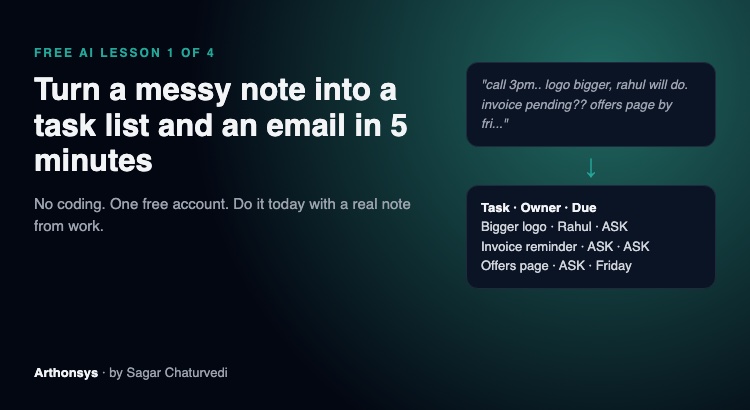
Free AI lesson 1 of 4 · by Sagar Chaturvedi, CEO & CTO, Arthonsys Technologies
If you are worried that AI will take your job, I have a simple suggestion: don’t start with the scary part. Start with the boring part of your day.
Every one of us has the same boring job. A call ends, a meeting ends, a client sends five messages in a row, and now someone has to turn that mess into “who does what, by when” and write the follow-up email. That someone is usually you, at 7 PM.
This is the first thing I would hand to AI. We do it every working day at Arthonsys: our team’s updates come in as chat messages and notes, and AI turns them into clear tasks with owners and dates. It does not replace anyone. It removes the 30 minutes nobody enjoyed.
Here is how to do it yourself today. You need a free account on Claude or ChatGPT. Nothing else.
Step 1: Paste the mess, exactly as it is
Don’t clean it up first. Copy your meeting notes, the WhatsApp thread, or the email chain, and paste it in. Spelling mistakes and Hinglish are fine.
Remove anything private first: passwords, bank details, a customer’s phone number. That rule matters more than any prompt.
Step 2: Ask for three things, in plain words
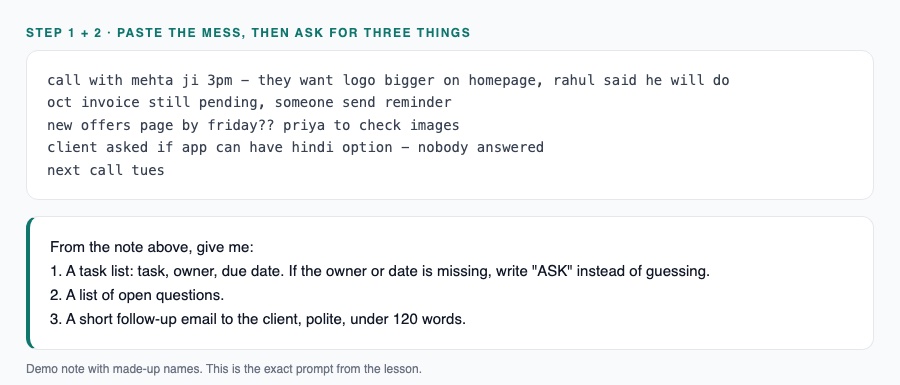
Type this under your note:
From the note above, give me:
1. A task list: task, owner, due date. If the owner or date is missing, write “ASK” instead of guessing.
2. A list of open questions.
3. A short follow-up email to the client, polite, under 120 words.
The “write ASK instead of guessing” line is the most useful line I know. AI fills gaps with confident guesses. This makes the gaps visible instead.
Step 3: Read it like a manager, not like a typist
Now spend two minutes checking it. Is every task really in the note? Did it invent a date? Did it give a task to the wrong person? Fix what is wrong by telling it (“Rahul owns the invoice, not Priya”) rather than editing everything by hand.
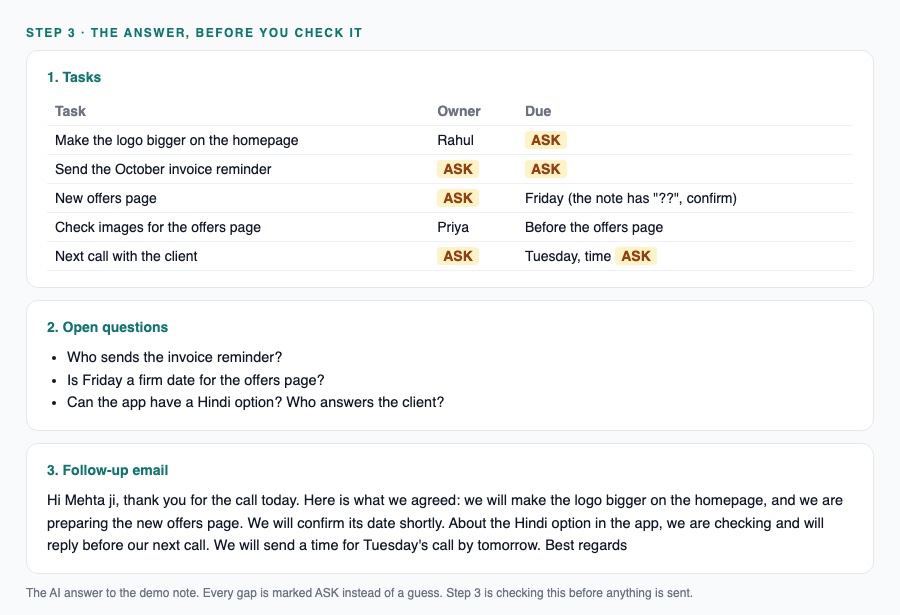
This step is the part of the job that stays yours. AI is quick and often right. It is also sometimes wrong in a very convincing way. The person who checks is the person who is still needed.
Step 4: Send, and save the prompt
Copy the email, adjust the tone if needed, and send it. Then save your three-line prompt somewhere you can find it. Tomorrow it takes one minute.
What this does and does not do
It will not understand your client better than you do. It will not know that a “quick change” from this particular client is never quick. It will save you the typing and make sure nothing in the note gets lost.
That is the honest size of the win: around half an hour a day, every day, for something you can learn this evening.
Your task this week: do this once with a real note from work. Next Monday, in lesson 2, I’ll show the four checks we run before anything AI-written goes to a client.
Frequently asked questions
Do I need to pay for Claude or ChatGPT to do this?
No. A free account on either one is enough for this lesson.
Is it safe to paste work notes into AI?
Remove anything private first: passwords, bank details and customers’ phone numbers. If your company has an AI policy, follow it.
Why ask the AI to write ASK instead of guessing?
AI fills gaps with confident guesses. Asking for ASK makes the missing owner or date visible, so a person can fill it in.
Want this set up for your whole team? See how we build AI agents for small teams or talk to us.